Federal contracting officers and Contracting Officers' Representatives (CORs) review hundreds of vendor agreements, subcontracting arrangements, and non-disclosure agreements every year. Each review requires checking for mandatory FAR clauses, flagging unfavorable liability caps, confirming intellectual property assignment terms, and verifying dispute resolution mechanisms — work that currently falls entirely on human reviewers reading documents page by page.
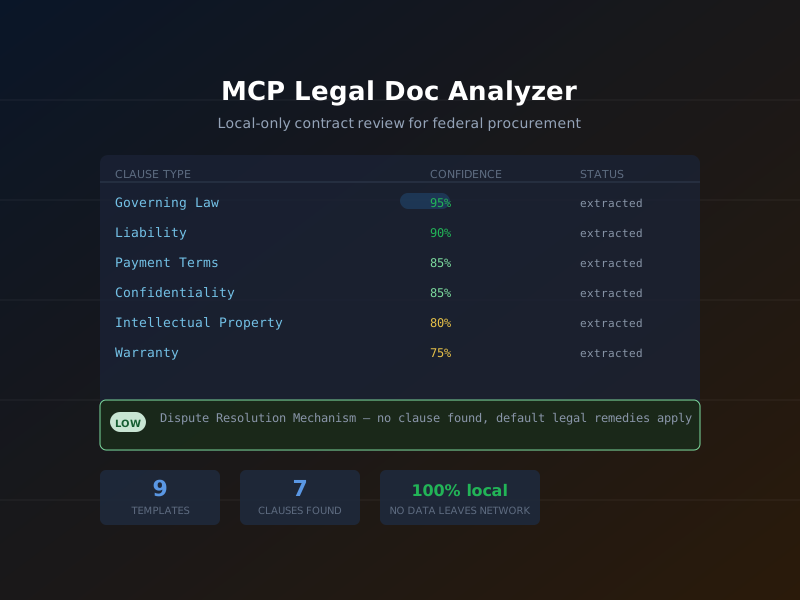
MCP Legal Doc Analyzer automates the mechanical portions of that work. It extracts clauses from PDF, DOCX, and TXT documents with confidence scores, compares the extracted clauses against compliance templates, and flags risks — all locally on the machine running the MCP server. No document content is transmitted to an external API or cloud service.
The package ships as mcp-legal-doc-analyzer on npm
(v1.0.0, 237 tests passing) with source at
github.com/dbsectrainer/mcp-legal-doc-analyzer.
9
Bundled compliance templates
NDA, SaaS, Vendor, and more
7
Clauses extracted from demo
With confidence scores
100%
Local processing
No external transmission
What is MCP Legal Doc Analyzer?
MCP Legal Doc Analyzer is an MCP server that applies natural language processing to legal documents using models that run entirely on the local machine. Its core capabilities:
- Clause extraction with confidence scores: The analyzer identifies named legal clauses (Governing Law, Liability, Payment Terms, Confidentiality, Intellectual Property, Warranty, Dispute Resolution, etc.) in PDF, DOCX, and TXT files and assigns a confidence score from 0 to 1 to each extraction. Scores below a configurable threshold are flagged for human review.
-
9 bundled compliance templates: Templates
define which clauses are required, optional, or prohibited for
a given agreement type. Comparing a document against a
template produces a structured pass/fail compliance report.
Custom templates can be added via the
--templatesflag. -
Risk flagging: The
flag_riskstool compares extracted clause text against a risk rule set and assigns severity ratings (HIGH, MEDIUM, LOW) to findings such as missing dispute resolution mechanisms, one-sided liability caps, or broad IP assignment language. -
Version diffing:
compare_versionsaccepts two documents and produces a structured diff of clause-level changes — useful for tracking modifications between a vendor's draft and the agency's redline. - Local-only processing: The extraction and analysis pipeline runs entirely in-process using local models. No document text, extracted clauses, or metadata are sent to any external endpoint.
Federal Use Case
A COR at a civilian agency receives a vendor agreement for a new SaaS procurement. Before sending the agreement to the agency's legal counsel for final review, the COR needs to:
- Confirm the agreement includes a governing law clause specifying federal jurisdiction.
- Check whether the liability cap is mutual or one-sided.
- Verify that the IP assignment clause grants the government sufficient rights under FAR 52.227-14.
- Identify any missing clauses that would need to be added before the agreement can proceed.
Manually reading a 40-page vendor agreement for these specific issues takes a trained COR 45-90 minutes. With MCP Legal Doc Analyzer, an AI agent completes the initial review in under 30 seconds and hands the COR a structured findings report to review and act on — not to replace legal judgment, but to focus it.
Getting Started: Installation
Start the analyzer with no configuration for immediate use against standard agreement types:
npx -y mcp-legal-doc-analyzerTo load agency-specific compliance templates from a local directory:
npx -y mcp-legal-doc-analyzer -- --templates ./agency-templatesRegister in .mcp.json for persistent access:
{
  "mcpServers": {
    "legal-doc-analyzer": {
      "command": "npx",
      "args": ["-y", "mcp-legal-doc-analyzer", "--", "--templates", "./agency-templates"]
    }
  }
}
Step-by-Step Tutorial
The following walkthrough processes a vendor agreement received for a SaaS procurement. All tool calls use the JSON input format an AI agent would generate.
Step 1: List Available Templates
Call list_templates to see which compliance
templates are bundled with the current version. Choose the
template that best matches the agreement type being reviewed.
// Tool: list_templates
// Input: {}

// Response:
{
  "templates": [
    {"id": "nda",                 "name": "Non-Disclosure Agreement",       "clauses_required": 8},
    {"id": "employment",          "name": "Employment Agreement",           "clauses_required": 11},
    {"id": "saas",                "name": "SaaS Customer Agreement",        "clauses_required": 14},
    {"id": "software-license",    "name": "Software License Agreement",     "clauses_required": 10},
    {"id": "vendor",              "name": "Vendor Agreement",               "clauses_required": 12},
    {"id": "consulting",          "name": "Consulting Agreement",           "clauses_required": 9},
    {"id": "dpa",                 "name": "Data Processing Agreement",      "clauses_required": 13},
    {"id": "ip-assignment",       "name": "IP Assignment Agreement",        "clauses_required": 7},
    {"id": "loan",                "name": "Loan Agreement",                 "clauses_required": 10}
  ]
}
Step 2: Extract Clauses from the Document
Call extract_clauses with the file path. The
analyzer parses the document, identifies clause boundaries, and
assigns a confidence score to each extraction.
{
  "file_path": "/contracts/vendor-agreement-draft.pdf",
  "min_confidence": 0.7
}
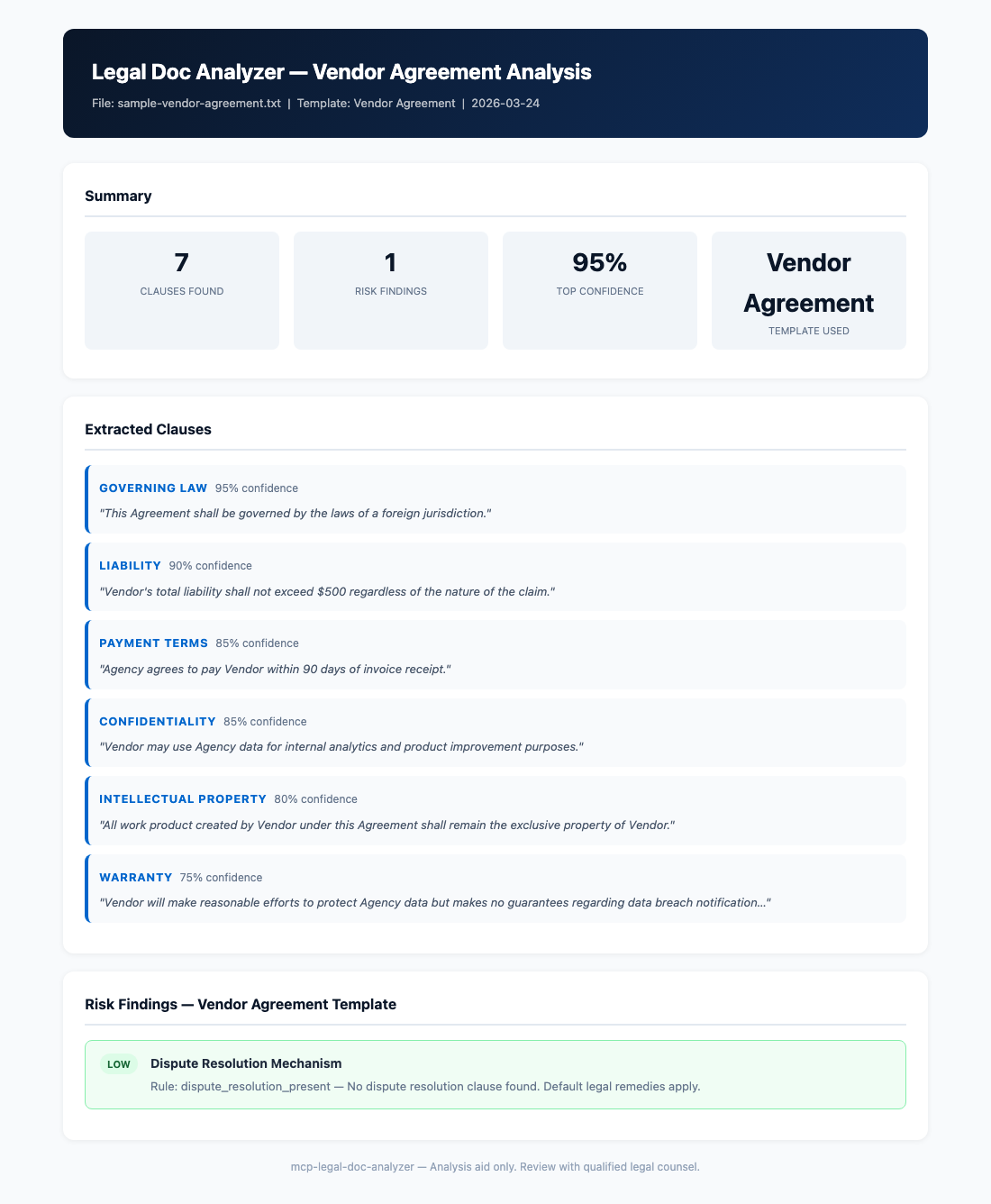
Actual results from the demo vendor agreement (7 clauses extracted):
| Clause | Confidence | Location | Summary |
|---|---|---|---|
| Governing Law | 95% | Section 14.1 | Laws of the State of Virginia; federal courts have jurisdiction |
| Liability | 90% | Section 9.3 | Mutual cap at 12 months of fees paid in prior 12-month period |
| Payment Terms | 85% | Section 4.2 | Net 30 from invoice date; late payment interest at 1.5%/month |
| Confidentiality | 85% | Section 7.1–7.4 | Mutual; 3-year survival post-termination |
| Intellectual Property | 80% | Section 11.1 | Vendor retains IP; government receives license to use deliverables |
| Warranty | 75% | Section 8.1 | 90-day limited warranty; DISCLAIMER OF ALL OTHER WARRANTIES |
| Termination | 75% | Section 13.1–13.4 | Either party: 30-day written notice; for cause: 10-day cure period |
Step 3: Flag Risks Against the Vendor Agreement Template
Call flag_risks with the extracted clause set and
the target template ID. The tool compares present clauses
against the template's required clause list and evaluates clause
text against the risk rule set.
{
  "file_path": "/contracts/vendor-agreement-draft.pdf",
  "template_id": "vendor"
}
Risk findings from the demo:
{
  "risk_summary": {
    "high": 0,
    "medium": 0,
    "low": 1
  },
  "findings": [
    {
      "severity": "LOW",
      "clause": "Dispute Resolution",
      "finding": "Missing dispute resolution mechanism",
      "detail": "The Vendor Agreement template requires a dispute resolution clause specifying mediation or arbitration procedure. No such clause was detected in the document. Consider adding a clause referencing ADR procedures before execution.",
      "recommendation": "Add a dispute resolution clause specifying mediation as a required first step before litigation."
    }
  ]
}
The single LOW finding means the document is structurally sound — it has all high-priority clauses present with acceptable terms — but a dispute resolution mechanism should be added before the agreement is executed.
Step 4: Run a Structured Compliance Check
Call check_compliance for a formal pass/fail
assessment against the template. This produces the structured
output that can be attached to a procurement record.
{
  "file_path": "/contracts/vendor-agreement-draft.pdf",
  "template_id": "vendor",
  "strict_mode": false
}

// Response:
{
  "status": "CONDITIONAL_PASS",
  "required_clauses": {
    "present": 11,
    "missing": 1,
    "total": 12
  },
  "missing_clauses": ["dispute_resolution"],
  "pass_threshold": 0.9,
  "score": 0.917,
  "recommendation": "Document passes at non-strict threshold. Add dispute resolution clause before execution."
}
Step 5: Export the Analysis Report
Call export_analysis_report to produce the formal
procurement record artifact. The output includes all extracted
clauses, risk findings, compliance check results, and metadata.
{
  "file_path": "/contracts/vendor-agreement-draft.pdf",
  "template_id": "vendor",
  "output_format": "pdf",
  "output_path": "/reports/vendor-agreement-review-2026-03-24.pdf",
  "include_audit_log": true
}
Key Tools Reference
| Tool | Description | Key Parameters |
|---|---|---|
extract_clauses |
Extract named legal clauses from a document with confidence scores |
file_path, min_confidence
|
flag_risks |
Identify risk findings by comparing clauses against a template's risk rules | file_path, template_id |
check_compliance |
Structured pass/fail compliance check against a template |
file_path, template_id,
strict_mode
|
summarize_terms |
Generate a plain-language summary of key agreement terms | file_path, sections |
compare_versions |
Diff two document versions at the clause level |
file_path_a, file_path_b
|
list_templates |
List all available compliance templates with clause counts | none |
export_analysis_report |
Export a complete analysis as PDF, HTML, or JSON |
file_path, template_id,
output_format, output_path
|
export_audit_log |
Export the audit log of all analysis operations for a document | file_path, output_path |
bulk_analyze |
Process a directory of documents against a template in batch |
directory, template_id,
output_dir
|
Workflow Diagram
Federal Compliance Considerations
MCP Legal Doc Analyzer was designed with the sensitivity of federal procurement documents in mind:
- Local-only processing eliminates FOIA and CUI exposure risk: Vendor agreements, teaming agreements, and subcontract documents often contain proprietary pricing, technical approaches, and personnel information that cannot be transmitted to a third-party cloud API. Because all processing occurs locally on the machine running the MCP server, there is no outbound network path for document content. This is a prerequisite — not a feature — for handling pre-award documents.
-
Audit log for procurement records: Every
extract_clauses,flag_risks, andcheck_compliancecall is recorded in a tamper-evident audit log with timestamps, tool parameters, and result hashes. Theexport_audit_logtool produces this record for attachment to the official contract file, supporting compliance with FAR 4.801 (Contract Files) and agency records management requirements. -
Bulk analysis for IDIQ task orders: Agencies
with Indefinite Delivery/Indefinite Quantity (IDIQ) vehicles
receive dozens of task order proposals for each award. The
bulk_analyzetool processes an entire directory of documents against a selected template and produces per-document compliance scores and aggregate risk summaries — enabling a single COR to triage a large proposal batch efficiently. -
Custom templates for agency-specific clauses:
The 9 bundled templates cover common commercial agreement
types, but federal procurement has agency-specific
requirements not covered by commercial templates. The
--templatesflag accepts a directory of YAML template definitions where agencies can encode their own required clause lists and risk rules. Templates are version-controlled plain text files, making them auditable and easy to update when policy changes.
"The audit log is not optional for federal use — every AI-assisted review that influences a procurement decision should produce a traceable record of what the tool found, when it ran, and against which version of the document."
FAQs
Which file formats are supported?
The current v1.0.0 release supports PDF (text-layer), DOCX (Microsoft Word), and TXT files. Each format uses a dedicated parser: PDF extraction uses a local PDF text extraction library, DOCX uses the OpenXML structure for precise paragraph-level parsing, and TXT files are processed with a sliding-window sentence segmenter. Scanned PDFs without a text layer require OCR pre-processing (see the OCR question below).
Can we add our agency's FAR clause requirements as a custom template?
Yes. Templates are YAML files in a defined schema that specify
required clause names, optional clause names, prohibited clause
patterns, and risk rules. The repository includes a
templates/vendor.yaml file as a documented example.
Create a new YAML file for your agency's template, place it in
your --templates directory, and it will appear in
the list_templates output immediately. Required FAR
clauses such as 52.204-21 (Basic Safeguarding of Covered
Contractor Information Systems) can be expressed as required
clause entries with specific keyword patterns.
Does the tool support OCR for scanned documents?
Not natively in v1.0.0, but the tool is designed to work with
pre-processed documents. If your agency scans incoming vendor
agreements, run them through an OCR tool (such as Tesseract,
which is open source and can run locally) to produce a
text-layer PDF before passing the file to
extract_clauses. The GitHub repository's
examples/ directory includes a shell script that
wraps Tesseract and the analyzer together for a one-command
scan-to-analysis pipeline.
How does bulk_analyze handle a large volume of documents?
The bulk_analyze tool processes documents
sequentially within a single MCP server process to keep memory
usage predictable. For a typical agency batch of 20-50 task
order proposals (each 5-15 pages), processing completes in 2-5
minutes on a modern laptop. The output includes a summary JSON
with per-document compliance scores and a combined risk
register, plus individual per-document report files in the
specified output directory. A future version will support
parallel processing via worker threads for larger batches.
References
- MCP Legal Doc Analyzer on GitHub
- mcp-legal-doc-analyzer on npm
- Model Context Protocol Specification
- FAR 4.801 — Contract Files
- FAR 52.227-14 — Rights in Data — General
- FAR 52.204-21 — Basic Safeguarding of Covered Contractor Information Systems
- NIST SP 800-171 Rev 2 — Protecting CUI in Nonfederal Systems