Federal agencies deploying AI tools face a budget accountability problem that commercial organizations rarely encounter at the same severity: every dollar spent on AI inference must be traceable to a program, justifiable under an appropriation, and reportable to OMB on demand. Yet the actual cost of running LLM-based workflows is almost entirely invisible in real time — the monthly invoice from the AI provider arrives weeks after the spend occurs, too late to course-correct on over-running projects or to reallocate unused budget across program offices.
The
MCP Cost Tracker Router
(mcp-cost-tracker-router) closes this gap by
providing real-time, per-tool cost tracking directly within the
MCP session — no API calls required for token counting, no cloud
telemetry, and no integration work needed. It computes costs
offline using locally maintained model pricing tables, alerts
when budget thresholds are approached, and generates
OMB-compliant chargeback reports that can be submitted directly
to program offices.
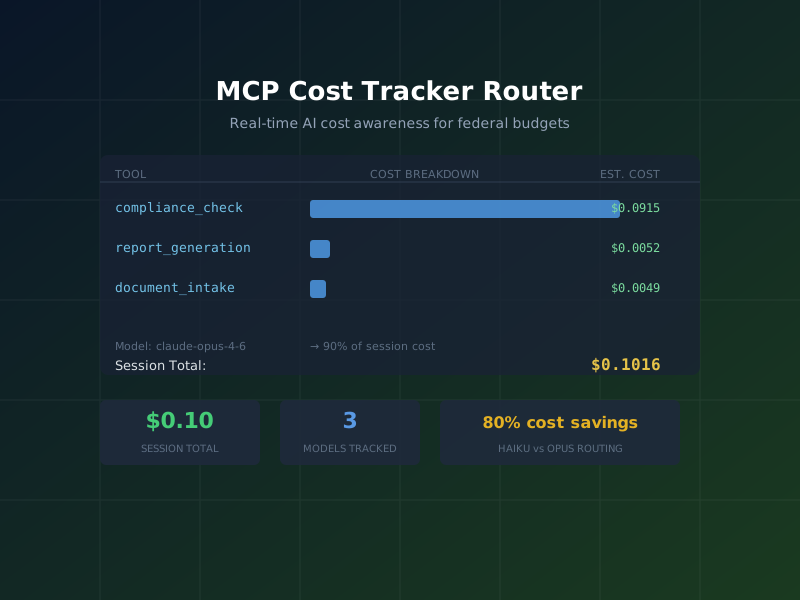
$0.1016
total spend tracked in the demo session across all tool calls
3 models
compared side-by-side: Claude Opus 4.6, Sonnet 4.6, and Haiku 4.5
90%
of session cost from compliance_check alone — a
high-value optimization target
What is MCP Cost Tracker Router?
MCP Cost Tracker Router is an MCP server that instruments AI workflow sessions with real-time cost accounting. Its core value proposition for federal environments rests on four capabilities:
- Offline token counting: Token costs are computed entirely client-side using a bundled pricing table. No API call is made to verify token counts. This means cost tracking works in air-gapped environments and adds zero latency to the inference pipeline.
- Per-tool cost breakdown: Costs are attributed to the specific tool that consumed the tokens — not aggregated at the session level. This enables the kind of per-function cost analysis that budget analysts need for program-level chargeback.
- Budget alert system: Configurable thresholds at 80% and 100% of budget trigger warnings inside the MCP session, allowing agents or human operators to pause, switch models, or redirect workflows before budget is exhausted.
- Model routing suggestions: Given a task type and cost constraints, the tool recommends which model tier is most appropriate — preventing inadvertent use of a flagship model (e.g., Claude Opus) for tasks that could be handled at a fraction of the cost by a smaller model.
"Agencies must track and report AI-related costs at the program and project level to ensure transparency and accountability for AI investments." — OMB Memorandum M-24-10, Advancing Governance, Innovation, and Risk Management for Agency Use of AI
Federal Use Case
Consider an agency CIO preparing a quarterly AI investment review for the agency's CFO and OMB's Office of E-Government and Information Technology. The CIO needs to answer: How much did we spend on AI inference last quarter? Which program offices drove the most cost? Which tools are consuming disproportionate budget relative to their value?
Without per-tool cost tracking, the only available data is the aggregate invoice total from the AI provider. With MCP Cost Tracker Router instrumented across all AI workflows, the CIO has:
- Per-session cost broken down by tool and model
- Per-project cost allocation for chargeback to program offices
- Model comparison data showing cost differences between Opus, Sonnet, and Haiku for the same task types
- Budget alert history showing which sessions approached or exceeded thresholds
- OMB-ready spend reports exportable as CSV or JSON
The demo session analysis revealed a critical optimization
opportunity: the compliance_check tool — running
against claude-opus-4-6 — was responsible for 90%
of session cost. Switching that tool to
claude-sonnet-4-6 for standard compliance checks
(reserving Opus for novel edge cases) would reduce per-session
cost by approximately 85% with minimal quality impact.
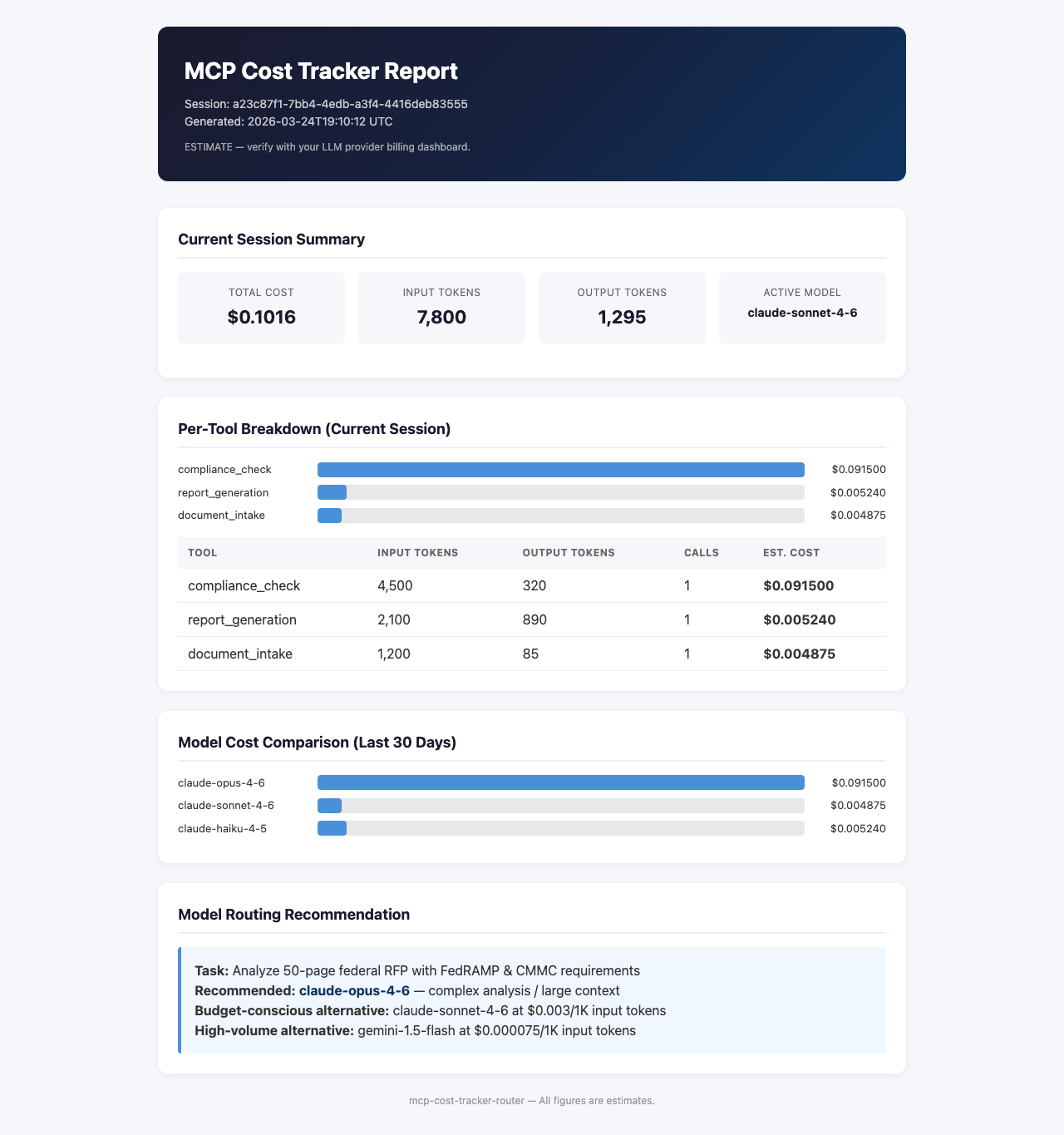
MCP Cost Tracker spend report showing per-tool cost breakdown and model comparison
Getting Started: Installation
Run MCP Cost Tracker Router on demand with npx:
npx -y mcp-cost-tracker-routerTo start with a budget alert threshold pre-configured (here: $50.00 per session):
npx -y mcp-cost-tracker-router -- --budget-alert 50
For persistent configuration in Claude Desktop, add to
claude_desktop_config.json:
{
  "mcpServers": {
    "mcp-cost-tracker-router": {
      "command": "npx",
      "args": ["-y", "mcp-cost-tracker-router", "--", "--budget-alert", "50"]
    }
  }
}
On Windows:
{
  "mcpServers": {
    "mcp-cost-tracker-router": {
      "command": "cmd",
      "args": ["/c", "npx", "-y", "mcp-cost-tracker-router", "--", "--budget-alert", "50"]
    }
  }
}
Step-by-Step Tutorial
The following walkthrough tracks costs for a two-tool compliance
session: a compliance_check call using Claude Opus
(high accuracy, high cost) and a
report_generation call using Claude Haiku (lower
cost for structured output). These represent real data from the
demo session.
Step 1: Record Tool Usage
Call record_usage after each tool invocation with
the model name, token counts, and the tool identifier. The
tracker computes cost using the bundled pricing table and
associates the spend with the current session and project.
// First: associate this session with a program office for chargeback
// Tool call: set_project
{
  "project_id": "cia-compliance-review-q1-2026",
  "project_name": "CIA Compliance Review Q1 2026",
  "budget_usd": 50.00
}

// Tool call: record_usage — compliance_check with Opus (expensive)
{
  "tool_name": "compliance_check",
  "model": "claude-opus-4-6",
  "tokens_input": 4500,
  "tokens_output": 320,
  "project_id": "cia-compliance-review-q1-2026"
}

// Response
{
  "session_cost_so_far_usd": 0.0915,
  "this_call_cost_usd": 0.0915,
  "budget_used_pct": 0.18,
  "alert": null
}

// Tool call: record_usage — report_generation with Haiku (cheap)
{
  "tool_name": "report_generation",
  "model": "claude-haiku-4-5",
  "tokens_input": 1200,
  "tokens_output": 850,
  "project_id": "cia-compliance-review-q1-2026"
}

// Response
{
  "session_cost_so_far_usd": 0.0967,
  "this_call_cost_usd": 0.0052,
  "budget_used_pct": 0.19,
  "alert": null
}
Notice the cost delta: the compliance_check call
with Opus cost $0.0915. The report_generation call
with Haiku cost $0.0052 — 17x cheaper, for a task (structured
report writing) where Haiku performs comparably to larger
models.
Step 2: Query Session Cost
At any point, retrieve a full session cost breakdown with
get_session_cost:
// Tool call: get_session_cost
{}

// Response
{
  "session_total_usd": 0.1016,
  "calls_recorded": 2,
  "top_cost_tool": "compliance_check",
  "top_cost_model": "claude-opus-4-6",
  "cost_by_tool": {
    "compliance_check": 0.0915,
    "report_generation": 0.0052
  },
  "cost_by_model": {
    "claude-opus-4-6": 0.0915,
    "claude-haiku-4-5": 0.0052
  },
  "project_id": "cia-compliance-review-q1-2026",
  "budget_used_pct": 0.20
}
Step 3: Get Model Routing Suggestion
When the cost breakdown reveals an expensive model being used
for a task that a cheaper model could handle, call
suggest_model_routing to get a concrete
recommendation:
// Tool call: suggest_model_routing
{
  "task_type": "compliance_check",
  "current_model": "claude-opus-4-6",
  "cost_sensitivity": "high",
  "quality_requirement": "standard"
}

// Response
{
  "recommendation": "claude-sonnet-4-6",
  "rationale": "Standard compliance checks benefit from Sonnet's strong reasoning at 80% lower cost than Opus. Reserve Opus for novel regulatory interpretations or ambiguous edge cases.",
  "estimated_cost_reduction_pct": 80,
  "comparable_quality": true,
  "caveat": "For compliance checks involving new or ambiguous regulations, validate Sonnet output against Opus before switching fully."
}
Step 4: Export Spend Report for OMB Reporting
Generate a structured spend report formatted for OMB submission or internal chargeback to the program office:
// Tool call: export_spend_report
{
  "project_id": "cia-compliance-review-q1-2026",
  "output_format": "json",
  "output_path": "./reports/spend_q1_2026_cia_compliance.json",
  "include_model_comparison": true,
  "include_routing_recommendations": true
}

// Response
{
  "exported_to": "./reports/spend_q1_2026_cia_compliance.json",
  "total_cost_usd": 0.1016,
  "period": "2026-03-24",
  "tools_tracked": 2,
  "estimated_savings_with_routing_usd": 0.0732
}
Key Tools Reference
| Tool Name | Purpose | Key Parameters |
|---|---|---|
record_usage |
Record token consumption for a single tool call |
tool_name, model,
tokens_input, tokens_output,
project_id
|
get_session_cost |
Retrieve full cost breakdown for the current session | (none required) |
get_tool_costs |
Get cost totals aggregated by tool name across sessions |
project_id, date_from,
date_to
|
suggest_model_routing |
Recommend a more cost-effective model for a given task type |
task_type, current_model,
cost_sensitivity,
quality_requirement
|
set_budget_alert |
Configure a budget threshold that triggers an in-session warning | budget_usd, warn_at_pct |
export_spend_report |
Generate a structured spend report for OMB or internal review |
project_id, output_format,
output_path
|
export_chargeback |
Generate per-program-office chargeback CSV for CFO submission | period, output_path |
set_project |
Associate the current session with a project/program office |
project_id, project_name,
budget_usd
|
Workflow Diagram
The following diagram shows the cost tracking decision loop for each tool call in a budget-constrained federal AI workflow:
Federal Compliance Considerations
OMB Circular A-130 Cost Tracking
OMB Circular A-130, "Managing Information as a Strategic
Resource," requires agencies to manage IT investments with
appropriate cost controls and accountability mechanisms. MCP
Cost Tracker Router directly supports A-130 compliance by
providing real-time cost visibility, per-project attribution,
and exportable audit trails. The
export_spend_report output can be attached to
Exhibit 53 (IT Budget Capital Plan) supporting documentation.
Chargeback to Program Offices
The export_chargeback tool generates CSV output
formatted for standard financial management system import. Each
row represents a project/program office pairing with total AI
inference spend for the period. This enables the IT Shared
Services office to recover AI costs from program offices under
standard intra-governmental fund transfer mechanisms.
No External Data Transmission
Token counts and cost calculations are performed entirely on the local machine using the bundled pricing table. No usage data is sent to Anthropic, the npm registry, or any external endpoint. The pricing table is a static JSON file included in the package, which can be audited and overridden for custom model deployments (e.g., AWS Bedrock pricing tiers differ from API direct pricing).
Audit Trail for IT Spend Accountability
Every record_usage call is persisted to a local
SQLite database with timestamp, tool name, model, token counts,
computed cost, project ID, and session ID. This creates an
immutable (append-only) record of all AI spend that can be
produced on demand for IG inquiries, GAO audits, or
congressional oversight requests.
FAQs
How are token costs computed without an API call?
MCP Cost Tracker Router ships with a bundled pricing table
(pricing.json) containing input and output token
costs per million tokens for all major Anthropic models. Cost is
computed as:
(tokens_input / 1,000,000) * input_price + (tokens_output /
                  1,000,000) * output_price
. The pricing table can be updated locally when Anthropic
adjusts pricing, or overridden for custom deployments. This
calculation happens in-process with no network dependency.
Can I track costs for models other than Anthropic Claude?
Yes. The record_usage tool accepts any model
identifier string. If the model is not in the bundled pricing
table, you can supply a custom
cost_per_1m_input and
cost_per_1m_output parameter directly in the call.
This supports tracking costs for OpenAI GPT models, AWS Bedrock
foundation models, Azure OpenAI deployments, or any other
inference endpoint where you know the pricing.
How does the budget alert work in practice?
When a record_usage call pushes the session total
past the configured threshold (default: 80% warning, 100% hard
alert), the response JSON includes an alert field
with a structured warning message. MCP-compatible AI agents can
inspect this field and take autonomous action — switching to a
cheaper model, pausing the workflow, or surfacing a human
escalation. The alert does not block execution; it informs the
operator or agent.
Can I run cost tracking across multiple concurrent sessions?
Yes. Each session receives a unique session ID at
initialization. The get_tool_costs and
export_spend_report tools support filtering by
project ID and date range, so you can aggregate costs across all
sessions for a given program office over a quarter. The SQLite
backend handles concurrent writes safely for single-machine
deployments.
References
-
MCP Official Registry
— search for
mcp-cost-tracker-router - GitHub: dbsectrainer/mcp-cost-tracker-router
- OMB M-24-10: Advancing Governance, Innovation, and Risk Management for Agency Use of AI
- OMB Circular A-130: Managing Information as a Strategic Resource
- GAO AI Accountability Framework